 gal (28)
Procreate Transform Tip - Nearest Neighbor vs Bilinear
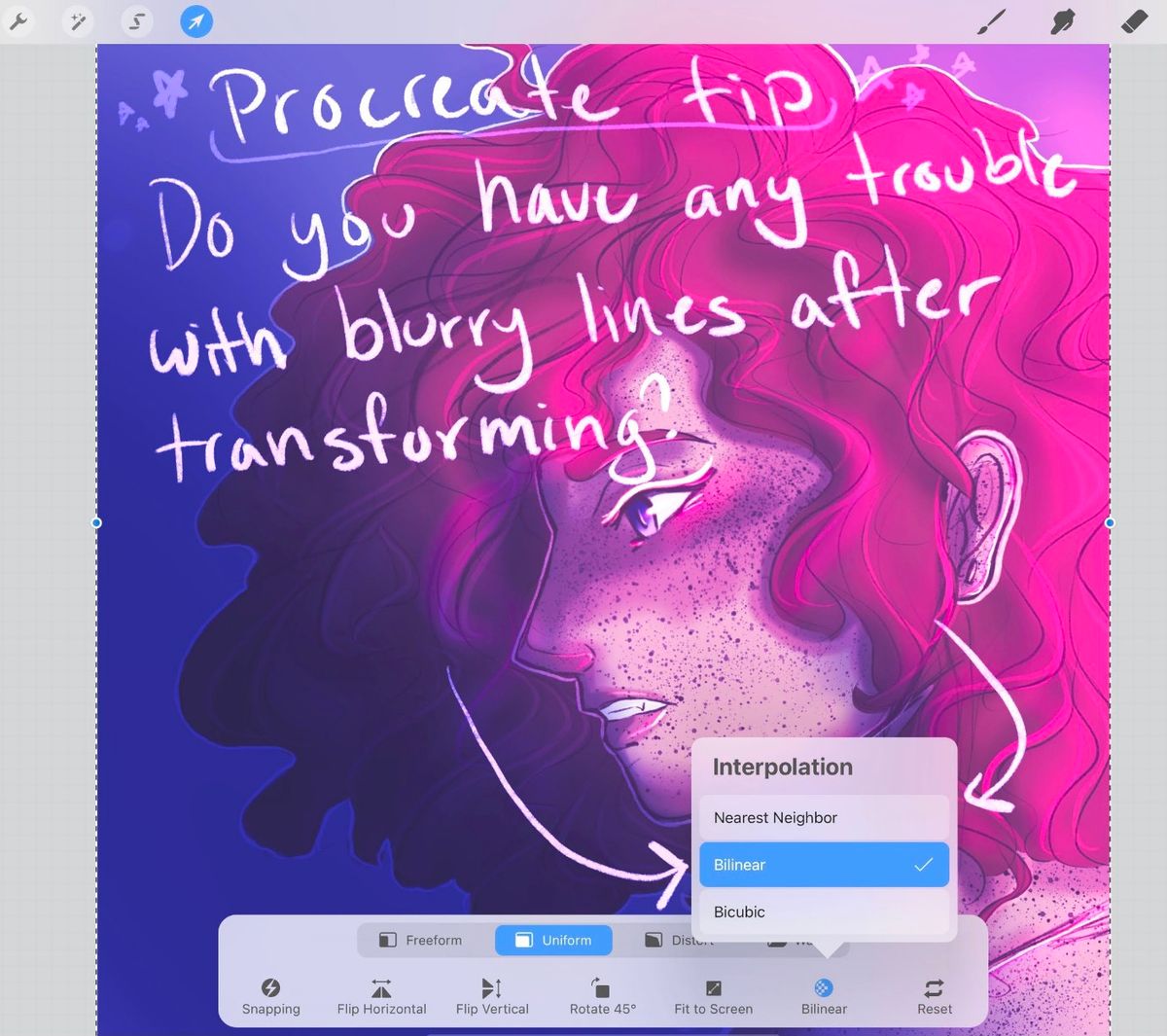
I'M REALLY PASSIONATE ABOUT THIS OKAYSo when I was starting with Procreate I was always SUPER frustrated with the fact every time I transformed something, from just resizing to tilting at like a 45° angle, or flipping horizontally... It would ALWAYS make the lines go fuzzy. Blurry, or like barbed?? It just made it go crazy. And it took me SO LONG to figure out how to fix this.
I want everyone who uses procreate to know this!!! None of us deserve our lines to distort

The default for procreate's 'Interpolation' is nearest neighbor. Switch it to Bilinear, and THAT'S IT. ALL PROBLEMS SOLVED. No more disgusting distorted lines.
Have you ever had this problem?? Did you already know the answer?? I Googled over several months before I found one tiny reddit post that opened my eyes

If you could, please share! If you know someone who uses procreate, share this info with them! It saved my art sanity, you've no idea
Jan 10, 2021#tutorial
#procreate
#question
Comments